Listens, thinks, answers
An orb that reacts to what she's doing
The orb isn't decoration. It moves with your voice while she listens, pulses as she works through your mail, calendar and tasks, and follows her own voice as she answers.

A cinematic intro that follows your scrolling: drifting through space to Anisa's orb, which lights up; her five portal cards fly out onto the real landing page; the camera dives into the General card and lands on the real General dashboard.Anisa's landing page on a sample profile: the orb at the centre with five portal cards around it, each showing one live number.
Coming soon
The intro is a cinematic render that lands on the real app.The real app on a sample profile.
Coming soon
One clear briefing across your inbox, calendar, and tasks, with an AI assistant that only tells you what's actually true. Join the waitlist.
02 / 05
03 / 05
04 / 05
05 / 05
See it in action
The real app running on a sample profile. Anisa's answers and voice are scripted for the demo; the weather is a placeholder.
Listens, thinks, answers
The orb isn't decoration. It moves with your voice while she listens, pulses as she works through your mail, calendar and tasks, and follows her own voice as she answers.
Ask anything
Speak or type. She searches your connected accounts, shows what she's looking up, answers from what she actually finds, and reads the answer back.
One place for everything
Each portal opens its own board: your briefing and ranked action list, calendar, inbox flow, connections, system gauges and focus load, all in one scroll.
Pick a mode
You stay in control
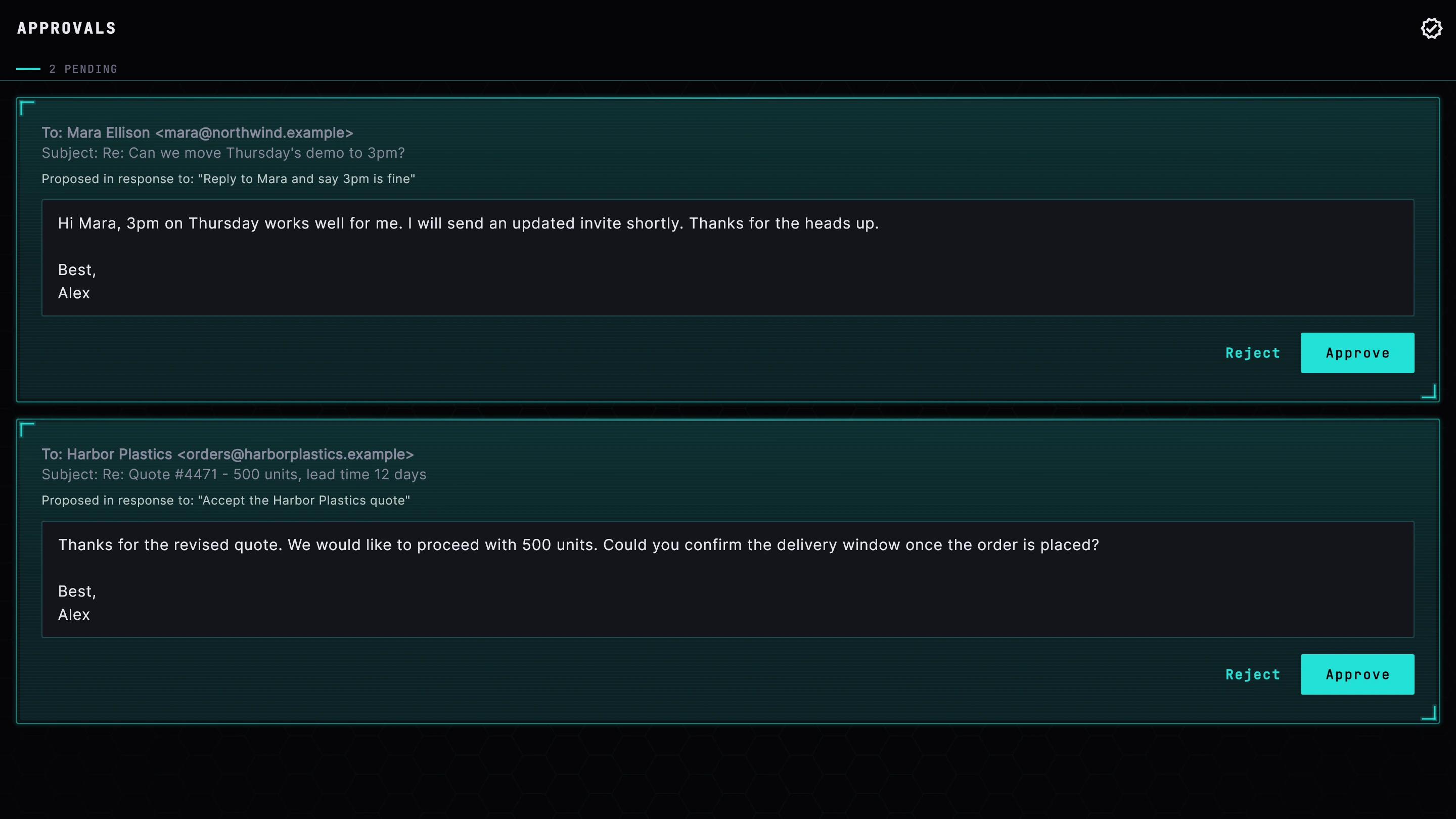
Replies she drafts wait in an approval queue. You read them, edit if you like, then approve or reject. She never sends anything on her own.
Make it yours
Pick a look and the whole app follows, from the landing page to every dashboard.
What you get
Tasks, overdue emails, and calendar items from every connected account in one list, ranked by urgency: one sorted list instead of four apps. Ask the assistant to re-prioritize on the spot.
A daily summary card tells you what happened while you were away, before you open a single app, with a line showing which emails and events it's based on. A 10-second catch-up instead of re-reading everything yourself.
The latest messages across connected Gmail accounts in one feed. No tab-switching between inboxes.
Replies are grounded in the real thread and land in an approval queue as editable cards, never sent on their own. Drafts written after reading outside content get a warning flag. Full control over anything sent in your name.
Save LinkedIn, email, cover-letter, and meeting-notes templates and copy any with one tap. The assistant checks them before drafting from blank.
Attach meeting audio and files to the item they belong to, and keep recaps in one consistent format.
The net worth you enter and the stock holdings you track, plus stock and crypto watchlists with charts, general and business news, and tracked event ticket prices, next to your inbox. Read-only: there is no trading in the app.
Local storage is encrypted by default, sign-in uses a proper desktop OAuth flow, and disconnecting an account is an action you take.
Every proposed action is hashed into an audit log, and the assistant is tested against prompt-injection attempts.
Use your own AI provider API key, or subscribe to an MLP plan. Tiers and pricing are coming soon.
Latest updates
New
Privacy & safety
Join the waitlist
Join our first round of testers. We'll send an invite as soon as it's ready.
This is early software. A few in-development features stay switched off until we've verified them.